



Cutting-Edge Ransomware Protection
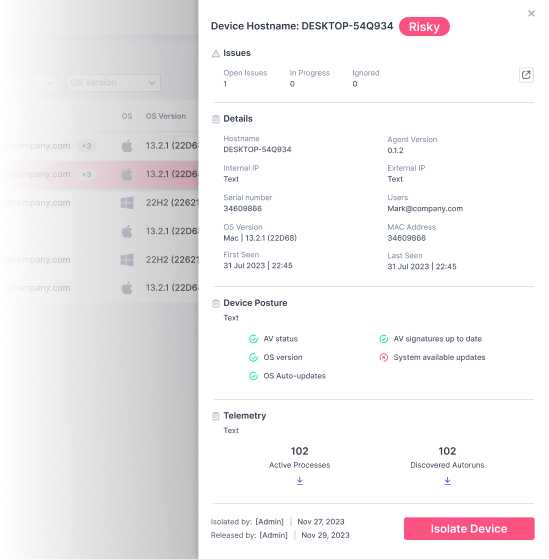
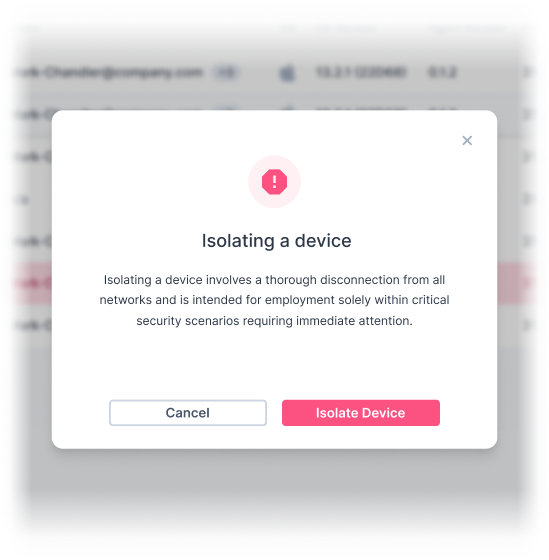
The Guardz device protection automatically identifies and isolates infected Windows and Mac systems
Ransomware Threat Escalates: SMEs on the Frontline
In data loss scenarios, paying a ransom provides no guarantee that the hackers will return the data uncorrupted or at all. There’s always a risk of permanent information loss.
The most immediate impact of a ransomware attack is the financial cost. This includes the ransom demanded by cybercriminals, potential loss of revenue due to disruption in operations, and expenses related to recovery efforts.
Ransomware attacks can grind business operations to a halt. If critical files or systems are locked, it might be impossible for a business to function until the issue is resolved.
If an attack leads to a data breach involving customers’ personal data, businesses could face hefty regulatory fines, especially under laws like GDPR.
Let's Dive into the Data
37 %
82 %
30 bn
Increase in ransomware
attacks occurred in 2023
Of ransomware attacks target
small businesses
Estimated global ransomware damages
projected to exceed by 2023
Guardz Ransomware Protection in Action


Guardz Multilayered
Ransomware Protection
Active Risk Prevention
The Guardz external risk monitoring offers an essential component to protect against ransomware attacks by conducting an automatic external surface scan. By assessing a business’s digital footprint, the solution identifies exposed services, and vulnerable software.
Guardz ensures that employees’ and clients’ digital assets remain secure from targeted malware attacks that take advantage of external vulnerabilities while preventing known CVEs are key vectors for cybercriminal exploitation.
Building Awareness Culture
Guardz ensures up-to-date employee training by notifying admins of training status and recommending industry-standard best practices. Customizable campaign planning allows businesses to target specific users and meet company goals.
Phishing simulations help employees learn to avoid threats like ransomware and malware, while mandatory evaluations measure the impact of training.
Secure All Inbound Emails
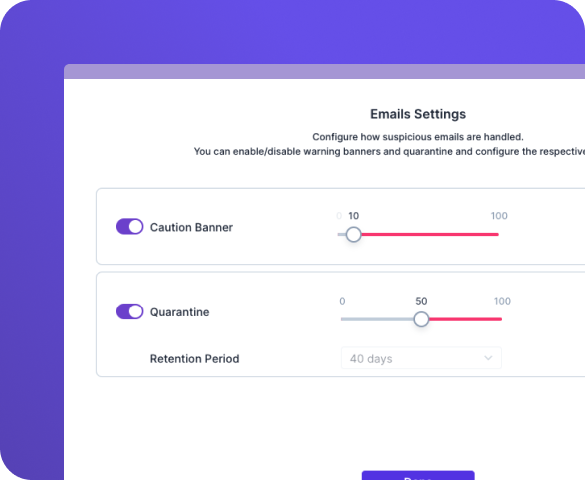
Guardz streamlines email protection with its fully managed, cloud-based solution that eliminates manual setup and seamlessly integrates with Microsoft 365 and Google Workspace accounts. Leveraging advanced predictive analysis, global intelligence tools, and continuous updates, Guardz provides robust defense against multiple attack vectors.
High-risk emails are immediately placed into quarantine to programmatically remove the threat. Employees receive warnings and recommended actions for potentially harmful emails, while IT admins can automatically flag and remove malicious messages.
Safeguard Web Browsing
The Guardz browser extension plays a vital role in safeguarding employees’ online security as they engage in their daily internet activities. Working seamlessly with the main platform, the extension actively monitors access to known malicious websites, web redirects to phishing sites, and continuously scans for unsafe browser extensions.
By offering real-time alerts and comprehensive website analysis, the Guardz browser extension empowers employees to make informed decisions and navigate the internet safely.
Endpoint Protection
Guardz provides an instrumental layer of security by pairing with Microsoft Defender Antivirus to proactively manage endpoint security for your organization. Performing ongoing scans in real-time on each device, the solution uncovers potential gaps in security posture, alignment with Defender policy settings and detection of real-world threats.
Strengthening internal security, Guardz assures your organization’s digital assets are protected against targeted digital attacks that exploit internal weaknesses. Guardz not only identifies these threats but provides real-time responses, including automated remediations, generating playbooks to address any issues, as well as offering a valuable snapshot of all processes for thorough investigation and research.
Reviews From Our Partners
Looking for Answers?
You're in the Right Place
Some common signs are an unexpected screen alert or pop-up message indication that your data has been encrypted, demands for a ransom payment in exchange for a decryption key, inability to access your files, and your system working slower than usual.
If you become a victim of a ransomware attack, it is advised not to pay the ransom. Instead, disconnect the affected device from your network to prevent the ransomware from spreading. Report the attack to the local authorities and get professional help to remove the ransomware. If possible, restore your files from a clean backup.
Paying the ransom doesn’t guarantee you will get your files back. It also pushes the cybercriminals to target more people and makes this kind of illegal activity attractive to others. Rather seek proffessional help before taking next steps.
Ransomware attacks can be prevented by regularly updating and patching systems, using reliable, and holisitic security solutions like Guardz, backing up important data, avoiding suspicious emails and links, and educating employees or users about the dangers of phishing scams.
Antivirus programs can detect and remove many types of malware, including some ransomware strains. However, no solution is 100% effective, so practicing safe browsing habits and regular data backups is also crucial.
The recovery time can vary widely depending on the extent of the attack and the availability of up-to-date backups. It can range from a few hours to several days or even weeks.
Contact us
to explore more
Schedule a demo, start a free trial, or request a quote, and more
We are here to assist you every step of the way
- +852 2893 8860
- sales@version-2.com
- +852 9843 8129